I thought my AI agent had a browser problem.
It was really an identity problem.
The setup looked reasonable at first. I had an agent runtime on a server, a browser sidecar running in a container, and Chrome DevTools Protocol exposed internally so the agent could drive the browser. The browser had a visible UI. The container stayed up. The session was supposed to be reusable.
But every so often, the agent’s browser would just die from the agent’s point of view.
Not because the container was down. Not because the web UI was gone. Those parts still looked healthy.
The failure was lower and more annoying: CDP stopped responding. The proxy in front of it returned 502 Bad Gateway. The runtime could not list tabs, open pages, or reuse the logged-in session.
Docker said the browser was running. The agent said it did not have a browser.
Both were kind of right.
Container health is not browser health
A browser sidecar has more moving parts than it first appears:
- A container and desktop environment.
- Chromium running inside that environment.
- A local CDP port.
- A proxy exposing that port to the runtime.
- The agent runtime connecting as a CDP client.
Any one of those layers can be alive while another is broken.
That matters because browser automation does not care whether the container process exists. It cares whether the automation endpoint works. If the proxy is alive but the Chromium CDP backend is unreachable, you get a false positive: the system looks up, but the useful part is down.
The frustrating part is that this failure mode is easy to misread. You open the browser UI and it appears fine. You check the container and it is still running. You restart the runtime and nothing changes. The actual broken contract is the one between the agent and the browser.
For simple stateless browsing, that might be fine. Restart the container. Start fresh. Move on.
Authenticated browsing is different.
A browser session is a credential
Once an agent depends on a logged-in browser, that browser is no longer just a rendering engine. It is part of the agent’s working identity.
It has cookies. It has session history. It has a relationship with the website. It may have passed MFA manually. It may have account-risk implications if it behaves strangely.
That changes the design requirements.
I did not want the agent to repeatedly log in. I did not want to automate password entry. I did not want it using my daily browser profile. I also did not want it silently falling back to public unauthenticated scraping when the authenticated path failed.
The clean boundary was:
- The human logs in manually.
- The agent reuses the browser session.
- The agent never sees the password.
- The agent gets its own browser profile.
- The browser automation endpoint stays on a private network.
That led me away from trying to make the container sidecar perfect and toward a more boring setup: a real browser on a real machine.
The new setup
I moved the canonical agent browser to a Mac laptop running at my home.
The high-level flow now looks like this:
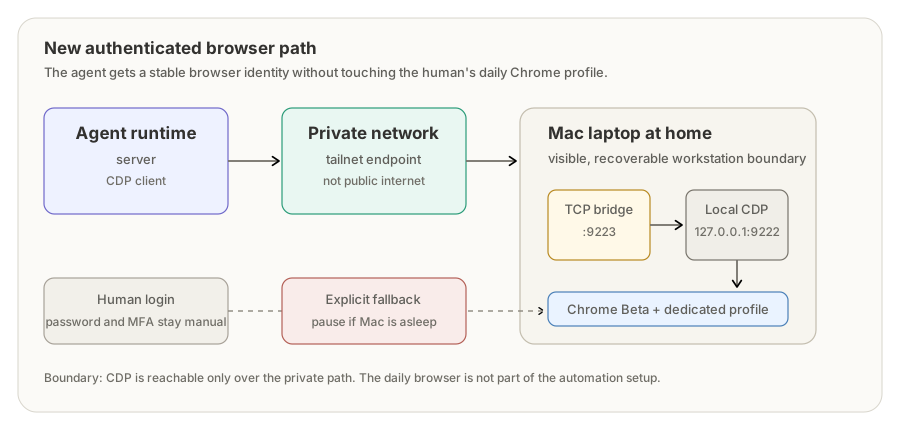
agent runtime on server
  -> CDP client
  -> private network endpoint
  -> Mac TCP bridge
  -> localhost CDP port
  -> Chrome Beta with a dedicated profile
  -> authenticated website session
The browser is Chrome Beta, not my normal Chrome.
That choice was deliberate. Normal Chrome with a separate profile directory would work, but it is visually easy to confuse with the browser I use every day. Canary is very distinct, but it updates constantly and can be less predictable. Chrome Beta is a good middle ground: separate app, stable enough, visually distinct enough.
The important part is not Beta specifically. The important part is that the agent has a browser that is visibly and technically separate from the human’s daily browser.
On the Mac, the browser is launched with a dedicated user data directory and CDP bound only to localhost:
open -na "Google Chrome Beta" --args \
  --user-data-dir="$HOME/AgentChromeBetaProfile" \
  --remote-debugging-address=127.0.0.1 \
  --remote-debugging-port=9222 \
  --no-first-run \
  --no-default-browser-check \
  --new-window \
  "https://example.com/"
Then a small private TCP bridge exposes that local CDP port over my private network:
socat TCP-LISTEN:9223,bind=<TAILSCALE_IP>,reuseaddr,fork TCP:127.0.0.1:9222
CDP is not on the public internet. It is not enabled on my daily browser. It is only reachable over the private path I configured for the runtime.
The login still happens manually in the visible Chrome Beta window. Once that is done, the agent can use the already-authenticated session without handling credentials directly.
Persistence is part of the product
After the manual setup worked, I made the Mac side persistent with LaunchAgents.
One LaunchAgent starts Chrome Beta with the dedicated profile and local-only CDP. Another starts the private TCP bridge. After login or reboot, the browser comes back without me reconstructing the whole setup by hand.
There is one very normal caveat: launchd does not keep a laptop awake.
If the Mac sleeps, closes, or leaves the network, the agent browser is unavailable. That is not a bug in the browser setup. It is a property of using a laptop as infrastructure.
The right response is not to hide that fact. The right response is to make the fallback behavior explicit.
The fallback rule matters
The specialist agent that needs this browser now has a simple policy:
- Use the dedicated Mac Chrome Beta profile as the primary authenticated browser.
- If the Mac is asleep or offline, pause authenticated browser actions gracefully.
- Continue non-browser work where possible: research, drafting, organizing notes, updating state.
- Do not use the human’s daily browser.
- Do not fall back to public unauthenticated scraping for the same task.
- Do not quietly return to the flaky sidecar unless explicitly allowed.
That last part is easy to overlook.
Fallback behavior is system design. If the primary path fails and the fallback is less safe, less authenticated, or less representative, the agent can do the wrong thing while technically continuing to work.
For sensitive browser tasks, pausing is often the correct fallback.
Verification changed too
The old question was, “Is the container running?”
The better question is, “Can the runtime actually talk to the browser?”
So the useful checks are closer to:
curl http://<private-mac-endpoint>:9223/json/version
and the runtime’s own browser diagnostics:
CDP HTTP passed
CDP WebSocket passed
Then the final check is practical: can the runtime see the existing tab and read the logged-in navigation UI?
That is the real health check. Not process health. Not proxy health. Agent-usable browser health.
What I learned
The lesson is not “never run browsers in Docker.”
Containers are fine for plenty of browser automation tasks. They are especially useful for stateless jobs, tests, screenshots, and disposable browsing.
But authenticated agent browsing has different requirements:
- persistent identity
- stable cookies
- manual recovery paths
- private networking
- clear separation from the human’s browser
- endpoint-level health checks
- explicit fallback behavior
A browser that holds a logged-in session is closer to a small workstation than a disposable helper process.
That mental model made the design clearer. The agent did not just need access to a browser. It needed a browser identity with boundaries.
Once I treated the browser as infrastructure, the solution got simpler: give it a dedicated app, a dedicated profile, a private network path, a real health check, and a policy for what happens when it is unavailable.
The boring version is the good version.